
AliExpress.io
Desktop wi-fi estação meteorológica relógio eletrônico sem fio bonito pequeno mini digital temporizador internacional temperatura umidade ao ar livre

Desktop wi-fi estação meteorológica relógio eletrônico sem fio bonito pequeno mini digital temporizador internacional temperatura umidade ao ar livre

4.520+ sold
€11.88€16.73
29% OFF
Buy on AliExpress

You will be redirected to AliExpress to complete your purchase

Specifications

Brand Name
GEEKMAGIC
Origin
Mainland China
High-concerned chemical
None
Battery Included
No
Model Number
smalltv
Style
Brief
Diameter
35
Function
With Backlight
Width
40
Display Type
DIGITAL
Type
Desk Clocks
Is Smart Device
Yes
Motivity Type
External Power Supply
Material
Plastic
Shape
SQUARE
Length
45

Product Description

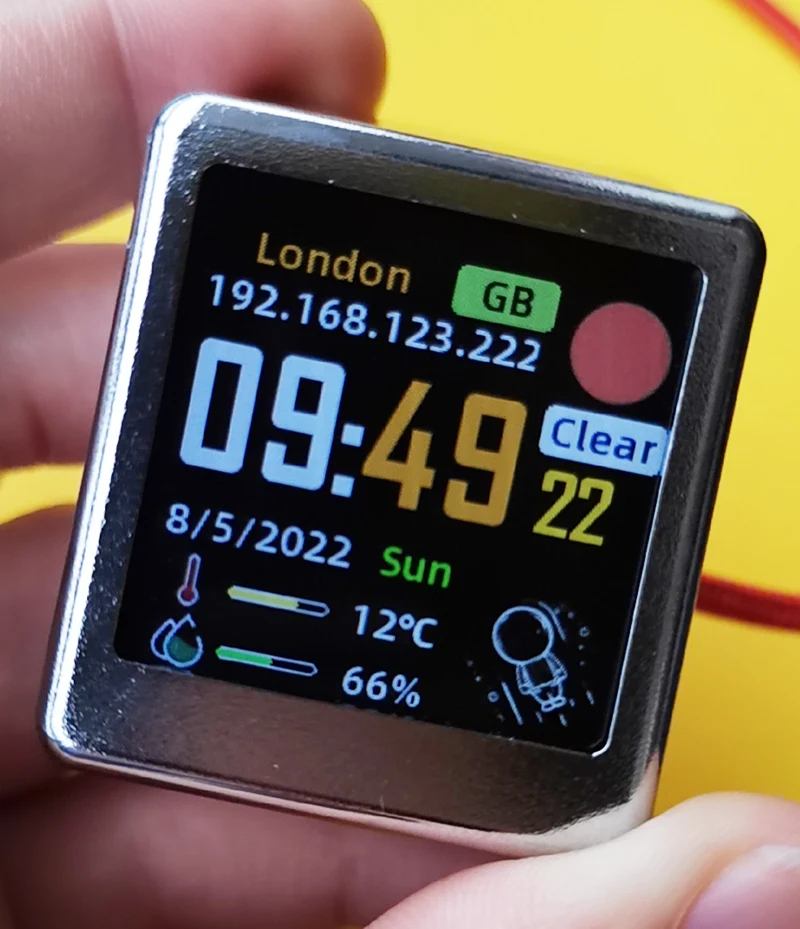
International version Small but cute Timer Clock Weather Station.

Screen : 1.54 inch TFT IPS screen with 240x240px

Interface:Type-C USB (no cable include!)

Power: 5V/1A

Size: 35mmx 37mmx 45mm

Lauguage: English only.

Function: show weather, pressure, min/max temperature, wind speed, city, country/region, week day, outdoor temperature and humidity, and  3 gif animations inside (you can choose or upload by yourself according to the instructions).


NO button, No alarm clock.


Plastic material, NO BATTERY INSIDE, about 20g weight.

ALL MAIN CITY SUPPORTED OVER THE WORLD.


Here is the User Manual:

//drive.google.com/file/d/1Zxrbon4l7i6k5vQLniN-HJpAi_qltxIu/view?usp=share_link


Q: How to connect clock to wifi?
A:
Step 1, Power On the weather clock with 5v DC, there will come out a wifi "GIF.TV" with no password, connect to it, on most cases, the phone will show up a setting page automatically. If not, open web broswer and visit //192.168.4.1/ will open the setting page manually.
Step 2, Chose internet connect, and scan wifi, choose your own wifi and input your password, then click save, it will restart to connect.
Step 3, if wifi is connected, it will show current clock time and default weather.

Q: How to set citycode ? Where to find citycode?
A:
We use API of the //openweathermap.org/find website, and you can input your cityname and search, take "London,GB" for example, the number "2643743" in the link address "//openweathermap.org/city/2643743" is the citycode of London. Copy the number and set it in the citycode setting area.

Q: How to change settings if wifi is connected?
A:
The GIF.TV will be off after wifi is connected, so this time look carefully a new IP address will be shown below the cityname of the screen. Connect to the same AP of weather clock, and visit the new IP address in your browser.

Q: How to upload gif images?
A:
Visit the setting page after WiFi is connected, choose upload gif and click upload button, then in the upload page, upload your own gif images. Remmember to crap or resize it to 80x80px and no bigger than 700KB. Ezgif.com website is highly recommended for modify gif images.

Q: How to reconnect to a new wifi?
A:
Plug out the power line when the progress bar is loading 2 times, the third time it will enter AP mode, the "GIF.TV" will come out, then you can connect to a new wifi.


Product information last updated on March 7, 2026