
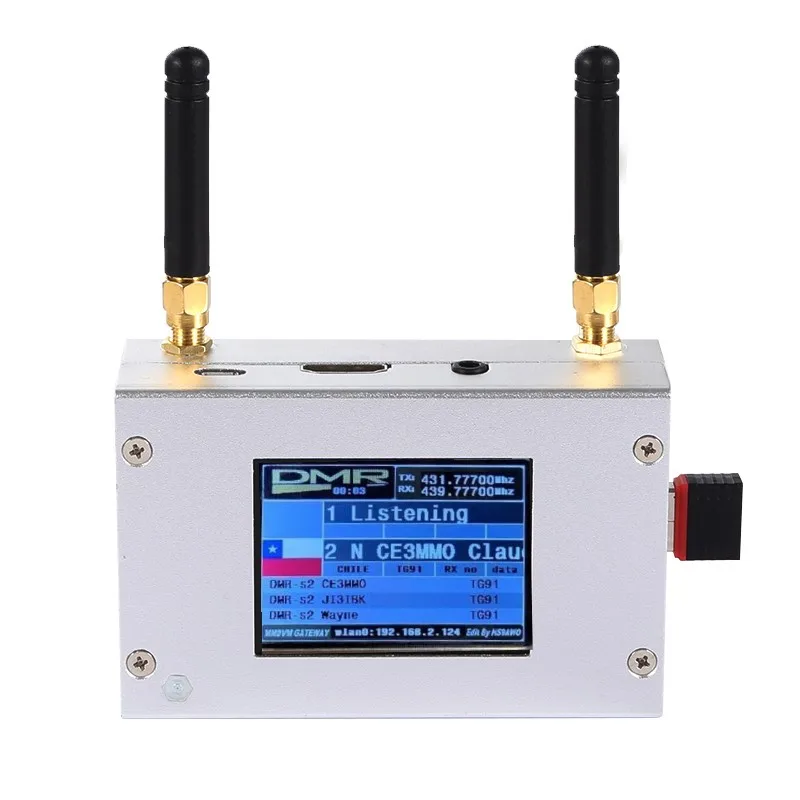
Dupleksowy hotspot MMDVM z kolorowym wyświetlaczem w obudowie ze stopu aluminium obsługujący dla C4FM/DMR/DSTAR P25 z Raspberry Pi 1B +
You will be redirected to AliExpress to complete your purchase
Specifications
- Nazwa marki
- AISANRAY
- Typ przedmiotu
- Adapter
- Substancja wzbudzająca szczególnie duże obawy
- Brak
- Pochodzenie
- CN (pochodzenie)
- Materiał
- Metal
- Numer modelu
- Duplex MMDVM
Product Description
Duplex MMDVM Hotspot w/ Aluminum Alloy Shell Color Display Screen Supporting For C4FM/DMR/DSTAR P25
Description:
It is a MMDVM hotspot digital networking box. Display firmware has been updated. Imported temperature-compensated crystal oscillators in DMR format with zero frequency offset and duplex dual time slots are used. It supports C4FM, DMR, DSTAR P25 and other digital formats. It solves inconsistency in digital intercom mechanism, enabling multi-digital system intercommunication. Using mobile phone hotspot network or WiFi network to connect to the Internet, it meets your dream of connecting with HAMs around the world.
Package Included:
1 x Set of MMDVM Hotspot
WiFi Settings when MMDVM is Started for the First Time:
I. Connect to Automatic AP Hotspot:
1. The hotspot is powered on.
2. Wait for Pi-Star to start. It usually takes about a minute (it will take longer if you use Pi0W). If your hotspot has a screen display, you can watch Pi-Star start up until the login prompt appears.
3. Wait 2 minutes for the Auto AP function to activate.
4. Check the hotspot named "Pi-Star-Setup" on your computer or mobile phone, and connect. WiFi hotspot: Pi-Star-Setup; password: 12345678
II. Log in to the Pi-Star Page:
1. After the connection is successful, users for Windows visit: //pi-star. Users for macOS, iOS or other (tablet for Windows 10) visit: //pi‐star.local. Mobile device access: 192.168.50.1
2. The first time you start Pi-Star, you will see a page that displays "No Mode Defined...". Click Configuration, or wait 10 seconds to be redirected to the configuration page
3. Enter the configuration page and enter the account password to log in to the Pi-Star page. Default username: pi-star; password: 12345678
III. Add Personal WiFi Connection:
1. After entering the configuration page, scroll to the "wireless configuration section" and click Configure WiFi
2. Select your country code, click Scan for Netwroks (10 secs) to start searching for WiFi, and wait 10 seconds.
3. If there is no WiFi you want to add in the search results, you can add it manually.
4. When the hotspot is restarted, it will be connected to the set personal WiFi. Visit Pi-Star in the browser for other configurations.
Pros & Cons
Pros
- Aluminiowa obudowa z wyświetlaczem
- Duplex z zerowym offsetem
- Wsparcie wielu trybów DMR itp.
- Aktualizowany firmware
Cons
- Wymaga Raspberry Pi 1B+
- Techniczny dla radioamatorów
- Ograniczony do konkretnych Pi
- Możliwe problemy z kompatybilnością
Common Questions
Z jakiego materiału jest hotspot MMDVM?
Obudowa ze stopu aluminium, kolorowy wyświetlacz.
Jakie wymiary duplex hotspotu?
Kompaktowy, pasuje do Raspberry Pi 1B+.
Wspiera C4FM/DMR/DSTAR P25?
Tak, duplex dla C4FM/DMR/DSTAR/P25 z Pi.
Jak skonfigurować z Raspberry Pi?
Podłącz do Pi 1B+, aktualizowany firmware, zero offset.
Czas wysyłki?
Z Chin, 10-20 dni, metalowa obudowa.
Product information last updated on November 30, 2025