
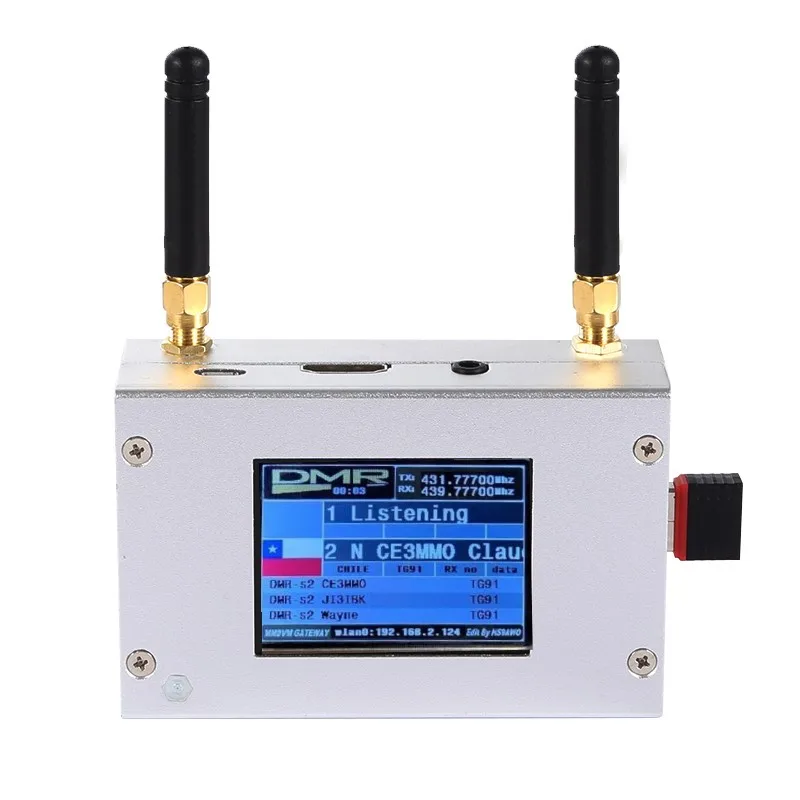
Duplex MMDVM Hotspot w/ Aluminum Alloy Shell Color Display Screen Supporting For C4FM/DMR/DSTAR P25 With Raspberry Pi 1B+
You will be redirected to AliExpress to complete your purchase
Specifications
- Brand Name
- AISANRAY
- Item Type
- Adapter
- High-concerned chemical
- None
- Origin
- Mainland China
- Material
- Metal
- Model Number
- Duplex MMDVM
Product Description
Duplex MMDVM Hotspot w/ Aluminum Alloy Shell Color Display Screen Supporting For C4FM/DMR/DSTAR P25
Description:
It is a MMDVM hotspot digital networking box. Display firmware has been updated. Imported temperature-compensated crystal oscillators in DMR format with zero frequency offset and duplex dual time slots are used. It supports C4FM, DMR, DSTAR P25 and other digital formats. It solves inconsistency in digital intercom mechanism, enabling multi-digital system intercommunication. Using mobile phone hotspot network or WiFi network to connect to the Internet, it meets your dream of connecting with HAMs around the world.
Package Included:
1 x Set of MMDVM Hotspot
WiFi Settings when MMDVM is Started for the First Time:
I. Connect to Automatic AP Hotspot:
1. The hotspot is powered on.
2. Wait for Pi-Star to start. It usually takes about a minute (it will take longer if you use Pi0W). If your hotspot has a screen display, you can watch Pi-Star start up until the login prompt appears.
3. Wait 2 minutes for the Auto AP function to activate.
4. Check the hotspot named "Pi-Star-Setup" on your computer or mobile phone, and connect. WiFi hotspot: Pi-Star-Setup; password: 12345678
II. Log in to the Pi-Star Page:
1. After the connection is successful, users for Windows visit: //pi-star. Users for macOS, iOS or other (tablet for Windows 10) visit: //pi‐star.local. Mobile device access: 192.168.50.1
2. The first time you start Pi-Star, you will see a page that displays "No Mode Defined...". Click Configuration, or wait 10 seconds to be redirected to the configuration page
3. Enter the configuration page and enter the account password to log in to the Pi-Star page. Default username: pi-star; password: 12345678
III. Add Personal WiFi Connection:
1. After entering the configuration page, scroll to the "wireless configuration section" and click Configure WiFi
2. Select your country code, click Scan for Netwroks (10 secs) to start searching for WiFi, and wait 10 seconds.
3. If there is no WiFi you want to add in the search results, you can add it manually.
4. When the hotspot is restarted, it will be connected to the set personal WiFi. Visit Pi-Star in the browser for other configurations.
Pros & Cons
Pros
- Aluminum alloy enclosure for improved heat resistance and durability
- Color display screen with updated firmware for easy use
- Supports multiple popular digital radio protocols
- Compatible with Raspberry Pi 1B+ for plug-and-play setup
Cons
- Requires a separate Raspberry Pi 1B+ host device to function (not included)
- Exact physical dimensions are not provided in the listing
- No wireless range or transmission power specs listed
- Limited to MMDVM digital radio networking use cases
Common Questions
What material is the hotspot device's enclosure made of?
The hotspot features a durable aluminum alloy shell for heat dissipation and long-term durability.
What digital radio protocols and host devices does this MMDVM hotspot support?
This hotspot supports C4FM, DMR, DSTAR, and P25 protocols, and is designed to work with the Raspberry Pi 1B+ as the host device.
What is the primary use case for this MMDVM hotspot?
This device is a digital networking hotspot for amateur radio users, enabling connectivity to digital radio systems via compatible Raspberry Pi hardware.
Where is this MMDVM hotspot shipped from, and what are the order terms?
This product ships from Mainland China, with standard industrial spare part order terms as listed in the product details.
What are the physical size details for this MMDVM hotspot?
Exact physical dimensions are not fully listed, but it includes a color display screen and compact metal enclosure for portable or mounted use.
Product information last updated on November 30, 2025