
AliExpress.io
Surenoo ESP32-S3 Open Source 1.28" Round Bionic Eyes LCD Display Xiaozhi AI Robert Deepseek Qwen3 WIFI Bluetooth for Ropet

Surenoo ESP32-S3 Open Source 1.28" Round Bionic Eyes LCD Display Xiaozhi AI Robert Deepseek Qwen3 WIFI Bluetooth for Ropet

55+ sold
£57.59£76.79
25% OFF
Buy on AliExpress

You will be redirected to AliExpress to complete your purchase

Specifications

Brand Name
SURENOO
Origin
Mainland China
Display Mode
NC
High-concerned chemical
None
Resolution
16*2
Model Number
ESP32-S3(Bionic-Eyes)
Type
IPS
is_customized
Yes
Resolution(Correct)
1.28inch 240*240
Interface
ESP32-Bionic-Eyes

Product Description


ESP32 Display Module Selection Guide
//www.surenoo.com/collections/258652


Seller Recommends

Surenoo ESP32-P4 Display Series


JC-ESP32P4-M3 Core Board

JC-ESP32P4-M3 Dev Board
7.0" 1024*600 ESP32-P4 Touch Display


10.1" 800*1280 ESP32-P4 Touch Display
4.3" 480*800 ESP32-P4 Touch Display

3.4"/4.0" ESP32-P4 Round Touch Display


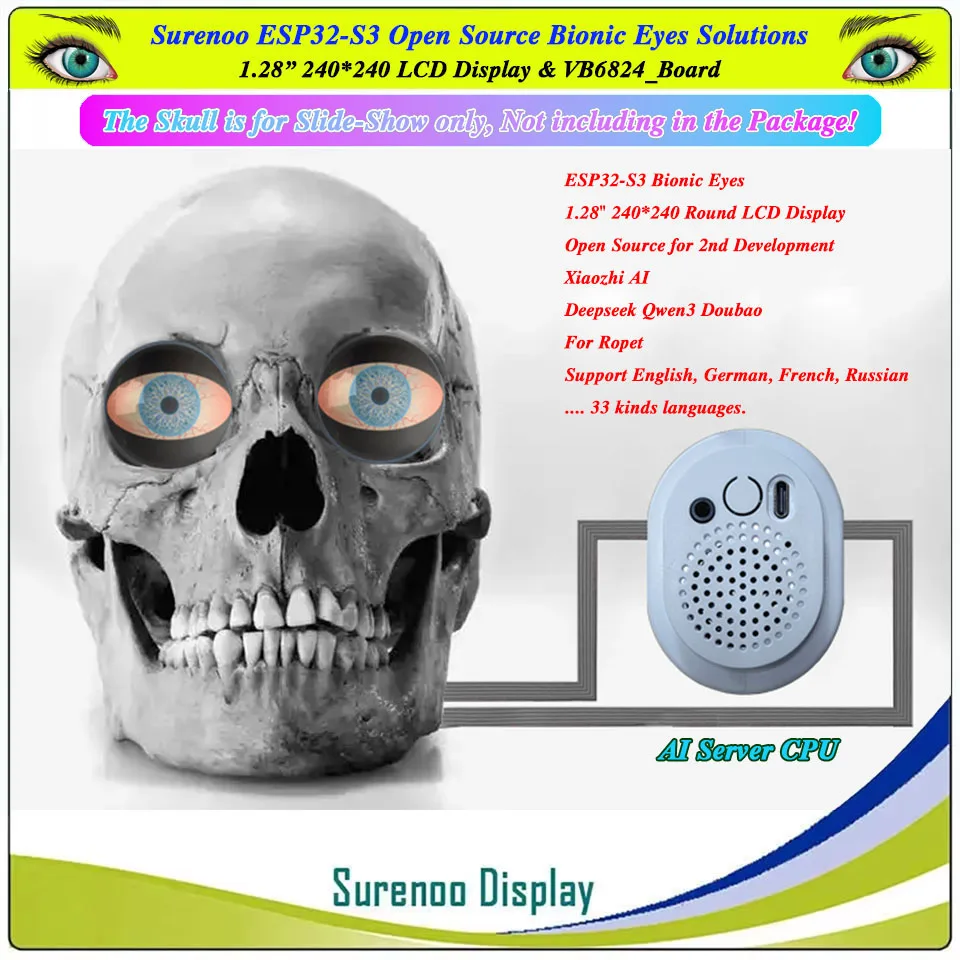
Surenoo ESP32-S3 Bionic Eyes Solutions
1.28" 240*240 LCD Display (VB6824_Board)
Open Source: //github.com/SmartArduino/RoPet_ESPS3_AI_EYE/tree/main

YouTube HD Link: //www.youtube.com/watch?v=x_gtGXtfr5I

  • Features
>> ESP32-S3 Main Chip
>> Support WIFI and Bluetooth
>> 4G Module is Optional
>> Support USB Type-C Charge
>> Support USB Type-C Burn Fireware
>> Support 3.5MM EarPhone
>> Dual 1.28" 240*240  Round SPI LCD Module
>> Battery Power Supply (3.7V, 1200mA)
>> Free 8Ω/W Speaker
>> Free Microphone
>> Free White Case
>> Open Source: //github.com/SmartArduino/RoPet_ESPS3_AI_EYE/tree/main
 
  • Packing List
1. ESP32-S3 Main Board X1PCS
2. 1.28" 240*240 SPI LCD Module X2PCS
3. 3.7V/1200mA LI-Battery X1PCS
4. 8Ω/W Speaker X1PCS
5. Microphone X1PCS
6. White Case X1Sets
  • How to use it? (Must work in WIFI network)
YouTube Link: //www.youtube.com/shorts/DVmzi5sAb_w
 
>> Device Distribution Network
 
1. When you get this products, you must first network the equipment before it can be used normally.
2. Press the button three times in a row, and the voice broadcast prompts "enter network distribution mode" to start network deployment.
3. If you want to connect to other networks, you can press the button three times to re-enter the network distribution mode.
4. The distribution network process is shown in the figure below. 
 
      4.1 Open the WLAN Setting on your SmartPhone, Choose "Xiaozhi-xxxx" network.   
      4.2 Type "192.168.4.1" in your Google Chrome Browsers to view it, choose your local WIFI Network, enter the password.   
      4.3 Device will restart in 3 seconds.


>> Add Device in "Xiaozhi.me" Server
 
After the network configuration is successful, it will prompt "Please log in to the control panel to add the device, enter the Verification Code xxxxxx", remember the verification code, and it is useful to add the device later.
 
1. Please type "//xiaozhi.me" in Google Chrome Browser in English Page.
2. Please use your phone to login in XiaoZhi AI Platform.
3. Click "Console" to Create Agent, you can Edit "Configure Role" by your hobby.
4. Click "Add Device" to enter "Verification Code xxxxxx", and then re-start the device.


>> How to wake-up it?
 
How to wake up to dialogue: The default wake-up word is "Hi Baby", say "Hi, Baby" to wake up the device and use it normally.

Switch Key functions:
 
1. Click the button: press to switch ask's intercom state, idle state (idle state needs to be woken up with a wake-up word before normal intercom) and listening state (just speak directly) back and forth.
2. Double-click button: Double-click the button is used to change the wake-up word. (This function is NOT opened)
3. Triple button: enter the network distribution mode and reconfigure the network.
4. Long press the button: the device is turned off and turned on.


>> How to use the Plugin (doit-gen-eye-firmware) to replace the Images of Bionic Eyes in your Firmware(*.bin)?
 
YouTube Link: //www.youtube.com/shorts/2WnJVlrYZcs
 
Tool Link:
//surenoo.com/uploads/82585/cart/resources/20250821/4ba010c9d67ad455815717a6899e25ba.zip

1. Prepare Materials

Refer to [Customization Document]:
//learn.adafruit.com/animated-electronic-eyes/customizing

* sclera.png
* iris.png
* lid-upper.png
* lid-lower.png
* lid-upper-symmetrical.png
* lid-lower-symmetrical.png

2. Modify the configuration file

(1). Modify the default under [firmware] to point to the .h file of the corresponding size
        A). For 1.28-inch screen, select defaultEye_1.28.h
        B). For 0.71-inch screen, select defaultEye_0.71.h
(2). Modify the input_firmware under [firmwar.e] to point to the corresponding firmware type
      A). V6824 board with 1.28 inch Screen select RoPet_ESPS3_AI_EYE_6824_1.28_en.bin
       B). V6824 board with 0.71 inch Screen select RoPet_ESPS3_AI_EYE_6824_0.71_cn.bin
       C). V8311 board with 1.28 inch Screen select RoPet_ESPS3_AI_EYE_8311_1.28_cn.bin
(3). Modify src_dir and name_map to point to the prepared material, and screen_type to point to the screen type (1.28 or 0.71)
(4). Execute "doit_gen_eye_firmware.exe' to run it
(5). Burn the "firmware.bin" firmware.(For firmware burning methods, see Using flash_download_tool to burn)
 
3. How to customize the eye style firmware?
(1). Replace the material array of "defaultEye_1.28.h" or "defaultEye_0.71.h" with your own project; 
(2). Compile and generate the firmware; 
(3). Place the firmware under "firmware";
(4). Modify the configuration file, pointing "input_firmware" to the compiled firmware; 
(5). Refer to the instructions again to generate the new firmware.

>> How to burn the Firmware(*.bin) to V6824 Board?
 
YouTube Link: //www.youtube.com/shorts/t8jNT9dCtxw

Firmware: //xiaozhi.doit.am/details.html?id=65
Tools: //dl.espressif.com/public/flash_download_tool.zip
 
1. How to enter the programming mode?


VB6824 board, press and hold the Key at the same time, use USB to connect to PC, the red indicator light on the board flashes, the mark enters the programming mode, and the Key can be released. (this process can open the serial port tool, when the Key is pressed into the USB, see these serial port tool to recognize the serial port. )

2. Firmware Burning
Open the provided Flash Download Tool to burn the "*.bin" file as following Images: 


Shenzhen Surenoo Technology Co., Ltd. is a professional display supplier since 2005, The company has its own trademark "Surenoo Display", dedicated to the LCD industry over 10 years, supply service for numerous domestic and foreign eBay and Alixpress buyers and companies. After more than ten years of development, it has gradually gained recognition and recognition from domestic and foreign customers. The company has a rich product line. The company's designers are composed of a group of experienced and experienced professionals who can provide customers with fast, high-quality design solutions and meticulous technical support.

In June 2019, we joined the Alibaba China Supplier Gold Certified Member, and we will provide professional services to our customers with more advantageous LCD product resources.

Factory

Certificate


We support the following payment methods.


We can Supply Airmail Shipping and Express Shipping to help you to save cost as following.

1. Airmail Shipping (20-60 working days)

Aliexpress Standard Shipping, China Post, Hong Kong Post, Singapore Post, Malaysia Post, Turkey Post, Netherlands Post, Swiss Post, DHL eCommerce, ......

2. ePacket Shipping (15-30 working days)

China Post ePacket, Netherlands Post ePacket, Swiss Post ePacket, ......

3. Special_Line Express (5-10 working days)

4. Comercial Express (3-8 working days)


Pros & Cons

Pros

  • High-res 240x240 1.28" round IPS for bionic eyes effect
  • ESP32-S3 with WIFI Bluetooth for AI like Deepseek Qwen
  • Open source customizable
  • Compact for robotics Ropet projects

Cons

  • Resolution listed inconsistently as 16*2
  • No battery included
  • Requires programming knowledge
  • NC display mode may limit views

Common Questions

What material or specs for ESP32-S3 bionic eyes display?

ESP32-S3 chip, 1.28 inch round LCD 240x240 IPS resolution.

What size is the 1.28" round display module?

1.28inch 240*240 resolution, compact for AI projects.

Compatibility for Surenoo ESP32-S3 with WIFI Bluetooth?

Open source for Xiaozhi AI, Robert, Deepseek, Qwen3, Ropet.

How to use this ESP32 bionic eyes LCD for projects?

WIFI Bluetooth, customizable, interface ESP32-Bionic-Eyes for AI displays.

Shipping for this ESP32-S3 display module?

Origin: Mainland China, is_customized: yes.

Product information last updated on March 19, 2026