
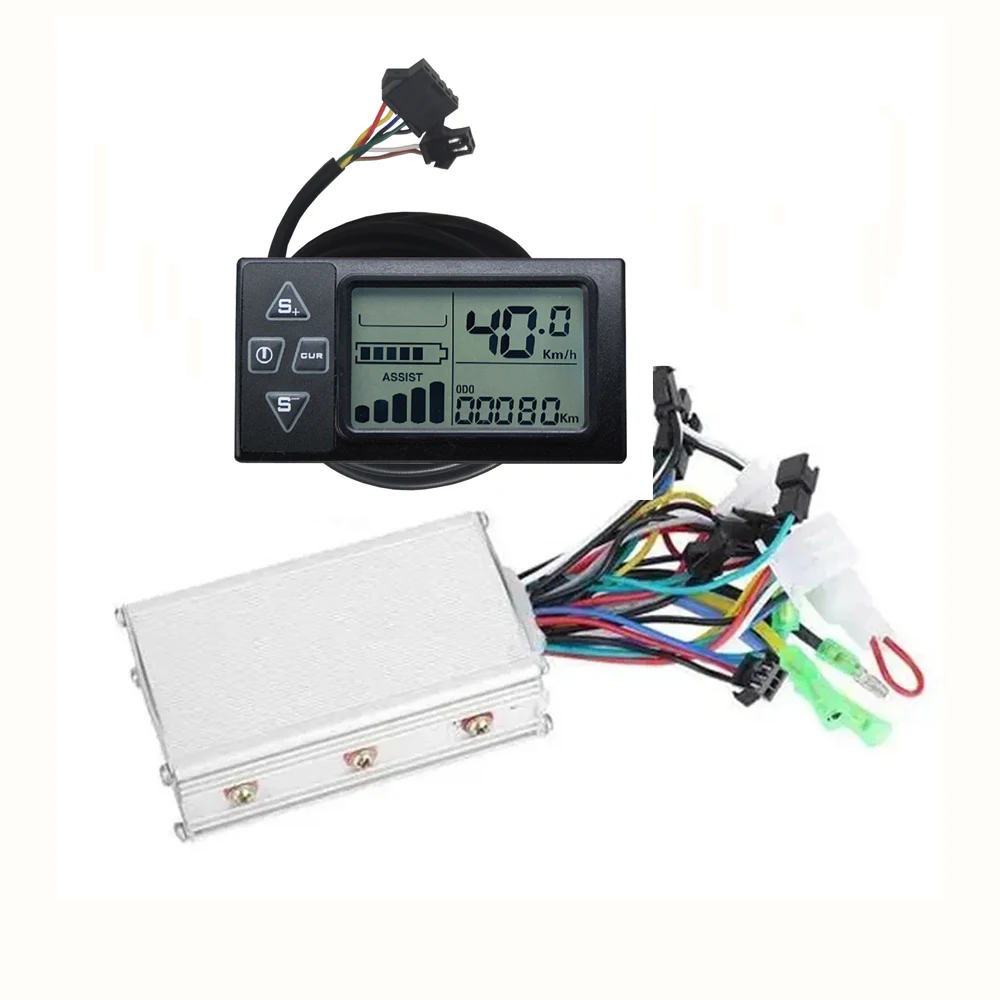
24V/36V/48V S861 Lcd Ebike Display Dashboard With 350W DC Motor Controller Voor Elektrische Fiets Bldc Controller For Ebike Part
You will be redirected to AliExpress to complete your purchase
Specifications
- Brand Name
- FOCAN
- Origin
- Mainland China
- High-concerned chemical
- None
- Special Features
- For speedmeter
- Country/Region of Manufacture
- CHINA
- Material
- ABS,Aluminum
- Item Weight
- 380g
- Controller Type
- DC Motor Controller
- Placement on Vehicle
- handle
Product Description
Note:
Not Universal Model .Only Used Our Store Controller with Our Store-LCD Display.
Features:
*6 MOS e-bike/scooter controller intelligent 2-mode(square wave with hall) for brushless motor
*The controller is made of aluminium alloy, and the 5-pins+2-pins display is made of ABS plastic
*Suitable for 250W/350W With Hall Brushless electric bike/scooter motors
*Comes with LCD display which can clearly display status and data, allowing you to see the screen clearly in a dim environment
Parameter
Item Type: Electric Display Screen
Model : LCD Display +DC Brushless Motor Controller
Product Material: ABS
Voltage: DC 24V 36V 48V 52V 60V(Adjust Voltage By P03 set )
Communication Protocol:UART NO.2
Suitable For Mounting Handlebars: 22.2mm Diameter Handlebars
Plug Type : SM 5pin Connector (LCD cable )+ SM 2pin connector (Light cable)
DC Brushless motor controller :
Condition: 100% Brand New
Material: Aluminum
Controller Rated Voltage:24-48V
Limited Current :15A
Speed set:1.1-4.2V
Mosfet:6Mosfet
Power :350W
Suit for :250W-350W DC Brushless Motor With Hall
Applicable model: electric bicycle, electric scooter, electric vehicle, toy scooter etc
Note: Due to product upgrade, the product you purchased may be slightly different from the descriptions in this user manual, and this won’t affect normal usage.
Package List:
1 x LCD Display
1 x Controller
Q: What kind of car is suitable?
A:Used For Brushless 250W/350W With Hall Motor ,Motor Voltage 24V/36V/48V or 36V/48V/60V
For example Your Motor is Single Voltage 36V ,You can be LCD meter P03 choose 36
Q: May I ask if the speed limit can be lifted?
A: It depends on whether your car is limited by the controller or the display screen. If the controller limits the speed, there is no way to lift the speed limit. If the display screen limits the speed, the speed limit can be lifted
Q:Can I try out this product? If it doesn't suit me, can I return it?
A: No, no returns or exchanges for non-quality issues.
Q: What voltage range does your display screen support?
A: Our display supports 24V/36V/48V/60V.(The S810 only supports 36v.)
Q: How to change the speed?
A: You can enter the menu by long pressing the + and - keys, and then short press the power button to switch to P08. After entering P08, use the + key to set the desired speed. After adjusting, long press the + and - keys to save and exit the menu.
Q: Is an immediate speed limit of 25 kilometers supported?
A: The specially customized version can support a fast speed limit of 25 kilometers per hour, while the regular version does not.
Q:Why Show Error Code E07 or How deal with Error Code ?
A:E07 :1. The motor Hall is not connected
2. Loose Hall plug of motor
3. The motor is broken
4. Set the S+(+) on the instrument panel, PAS display 2, rotate the handle, and the instrument panel will automatically disappear after the gear rotates at high speed
Q: Show the speed is Wrong .
Please set and choose P06 and P07
The advantage of this design is that the controller is compatible with almost all brushless motors. Many single mode sine wave controllers on the market do not have self-learning wires, and this controller is designed with self-learning motors to perfectly solve this problem that bothers users.
After setting P06 and P07, you can test the real time speed with map navigation APP, if the LCD display speed is bigger than the navigation display speed, then you can reduce the parameter of P07 to lower the speed display ratio.
If the LCD display speed is less than the navigation display speed, you can increase the parameter in P07 to increase the speed display ratio. After finding the exact speed that suits you in this way, you will see the LCD displaying the exact speed.
How to enter Setup Mode?
Long press the + and - buttons for 3-5 seconds after switching on the computer to enter the setting mode, the parameters will blink.
Short press M button to switch parameters, press + and - buttons to select parameters.
Parameter introduction
P00: Restore factory setting
P01: Backlight Brightness
P02: Mileage unit
P03: Voltage selection
P04: Sleep Time
P05: PAS Gear
P06: Wheel Diameter
P07: Speed Magnet
P08: Speed Limit
P09: Zero Start Non-Zero Start
P10: Drive mode setting, 0: PAS drive, 1: throttle drive, 2: PAS and throttle drive
P11: PAS sensitivity setting
P12: PAS start strength setting
P13: PAS magnet disc type setting
P14: Current Limit Setting
P15-16-17-18-19: Functions not yet opened, please ignore do not set up
Based on the principle of mutual benefit, all goods are shipped from China. If there are any quality issues, we will do our best to handle them. However, we refuse any returns or refunds caused by disputes due to dislike, unsuitability, incompatibility, etc. We will block and file complaints.Purchase with caution
Product information last updated on December 23, 2025