
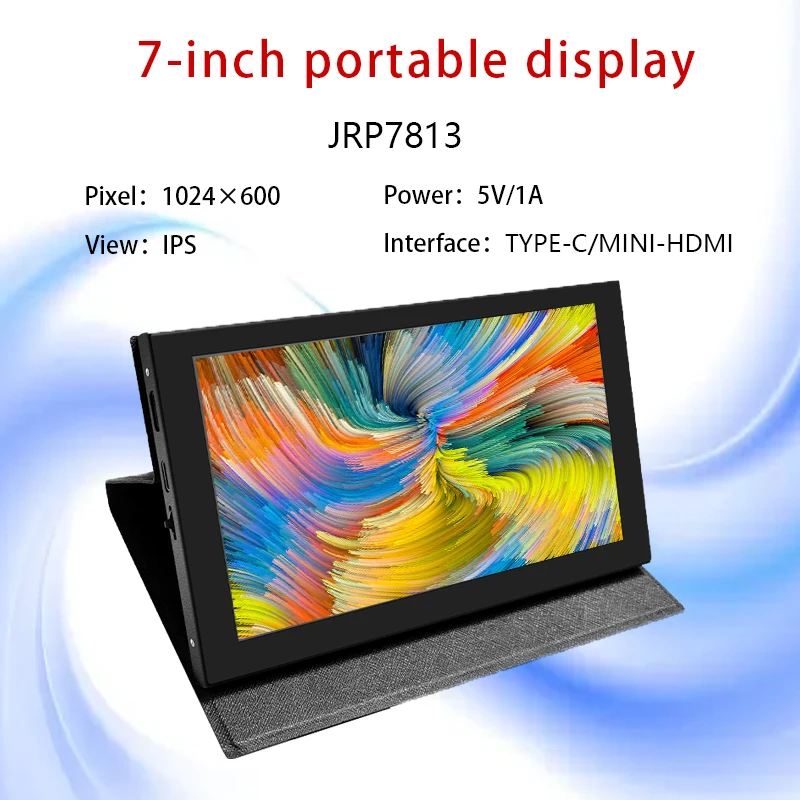
Pantalla TFT de 7 pulgadas Raspberry pi 5 LCD con estuche módulo portátil 1024*600 panel táctil de capacitancia Monitor de pantalla electrónica tipo c
You will be redirected to AliExpress to complete your purchase
Specifications
- Nombre de la marca
- JINGLITAI
- Origen
- CN(Origen)
- Modo de visualización
- 1000
- Producto químico de alta preocupación
- Ninguno
- Resolución
- 08*01
- Número de modelo
- JRP7813
- Tipo
- pantalla TFT
- es personalizado
- Sí
- Resolution
- 1024*600
- Size
- 7 inch
- Diver IC
- /
- Interface Type
- HDMI
- View Angle
- IPS
- Touch Panel
- CTP
- Screen Type
- LCD
- Certification
- CE,RoHS
- interface TYPE-C
- TYPE-C
Product Description
●7inch standard display, 1024 × 600 Hardware resolution, Up to 1920x1080 Software configuration resolution.
●Capacitive touch screen, maximum support 5point touch.
●Support backlight control alone, the backlight can be turned off to save power.
● Support Raspberry Pi, BB Black, Banana Pi and other mainstream mini PC.
●Can be used as general-purpose-use HDMI monitor, for example: connect with a computer HDMI as the sub-display .
●Used as a raspberry pi display that supports Raspbian, Ubuntu, Kali-Linux, Kodi, win10 IOT, single-touch, free drive.
●Work as a PC monitor, support win7, win8, win10 system 5 point touch (XP and older version system: single-point touch),free drive.
●CE, RoHS certification.
【ProductParameters】1
●Size:7.0 (inch)
● Resolution: 1024 × 600 (dots)
● SKU: JRP7813
● Touch: five-point capacitive touch
●Weight: 520 (g)
【How to use with Raspbian/Ubuntu Mate/Win10 IoT Core System】1
●Step 1, Install Raspbian official image
1) Download the
latest image from the official download.
2) Install the
system according to the official tutorial steps.
●Step 2, Modify the “config.txt”
After the programming of Step 1 is
completed, open the config.txt file of Micro SD Card root directory and add the
following code at the end of the file, save and eject Micro SD Card safely:
max_usb_current=1
hdmi_force_hotplug=1
config_hdmi_boost=10
hdmi_group=2
hdmi_mode=87
hdmi_cvt 1024 600 60 6 0 0 0
●Step 3, Insert the Micro SD Card to Raspberry Pi, connect the Raspberry Pi and LCD by HDMI cable; connect USB cable to one of the four
USB ports of Raspberry Pi, and connect the other end of the USB cable to the USB port of the LCD; then supply power to Raspberry Pi; after that if the display and touch both are OK, it means drive successfully (please use the full 2A for power supply).
★ How to rotate display direction:
1. Open the “config.txt” file (the “config.txt” file is located in /boot):
sudo nano
/boot/config.txt
2. Add the statement in the “config.txt” file, press Ctrl+X to exit, press Y to save.
display_rotate=1
#0: 0; 1: 90; 2: 180; 3: 270
3. Restart the Raspberry Pi after saving.
sudo
reboot
★How to rotate Touch direction:
After the display is rotated, the touch needs to be modified.
1. Install libinput
sudo
apt-get install xserver-xorg-input-libinput
2. Create the xorg.conf. D directory in /etc/x11 / below (if the directory already exists, this will proceed directly to step 3).
sudo
mkdir/etc/X11/xorg.conf.d
3. Copy the file “40-libinput.conf” to the directory you just created.
sudo cp
/usr/share/X11/xorg.conf.d/40-libinput.conf /etc/X11/xorg.conf.d/
4. Edit “/etc/X11/xorg.conf.d/40-libinput.conf”.
sudo nano
/etc/X11/xorg.conf.d/40-libinput.conf
Find a part of the touchscreen,add the following statement inside, press Ctrl+X to exit, press Y to save.7inch HDMI Display-C user manual.
Option
"CalibrationMatrix" "0 1 0 -1 0 1 0 0 1"
5. Restar your Raspberry Pi
sudo
reboot
Complete the above steps for a 90 degree rotation.
Note:
0 degrees of rotation parameters: Option "CalibrationMatrix" "1 0 0 0 1 0 0 0 1"
90 degrees of rotation parameters: Option "CalibrationMatrix" "0 1 0 0-1 1 0 0 1"
180 degrees of rotation parameters: Option "CalibrationMatrix" "-1 0 1 0 -1 1 0 0 1"
270 degrees of rotation parameters: Option "CalibrationMatrix" "0-1 1 1 0 0 0 0
【How to use as PC monitor】1
● Connect the computer HDMI output signal to the LCD HDMI interface by using the HDMI cable.
● Connect the LCD's USB Touch interface (Either of the two MicroUSB) to the USB port of the device.
● If there are several monitors, please unplug other monitor connectors first, and use LCD as the only monitor for testing.
A&Q
1.How to use it?
First plug in the USB line,and power up,then you can see HDMI in the display,so you can plug in HDMI line,like this you can enter the system.
2.can I use it in computer?
Yes,it can be used in the raspberry pi 3、raspberry pi 4,、raspberry pi zero W and mini pc.
Pros & Cons
Pros
- Pantalla táctil capacitiva de 7 pulgadas con resolución 1024*600 para una visualización clara.
- Compatible con Raspberry Pi 5 y soporta resoluciones más altas en configuración software.
- Ruta de envío en Brasil con envío gratuito y exención de impuestos de importación.
- Cuenta con certificaciones CE y RoHS para garantizar la calidad y seguridad del producto.
Cons
- No se detallan las dimensiones exactas del estuche incluido en el producto.
- La resolución hardware es de 1024*600, no compatible con resoluciones más altas de forma nativa.
- No se indica si incluye cables de conexión para la instalación.
- No se especifica el valor exacto del contraste de la pantalla.
Common Questions
¿De qué material está fabricada esta pantalla TFT?
Está fabricada con panel LCD TFT, vidrio de pantalla táctil capacitiva y componentes electrónicos estándar.
¿Cuál es el tamaño y la resolución de esta pantalla?
Es una pantalla de 7 pulgadas con resolución hardware de 1024*600, y soporta resoluciones software de hasta 1920x1080.
¿Qué dispositivos son compatibles con esta pantalla?
Está diseñada específicamente para funcionar con la placa Raspberry Pi 5, además de otros dispositivos con conexión HDMI.
¿Para qué se usa esta pantalla TFT?
Se usa como monitor de pantalla electrónica para Raspberry Pi 5, para proyectos de electrónica, sistemas de monitorización o entretenimiento.
¿Qué ventajas tiene la ruta de envío en Brasil?
Cuenta con envío gratuito y exención de impuestos de importación para compras en la zona de Brasil.
Product information last updated on March 12, 2026