
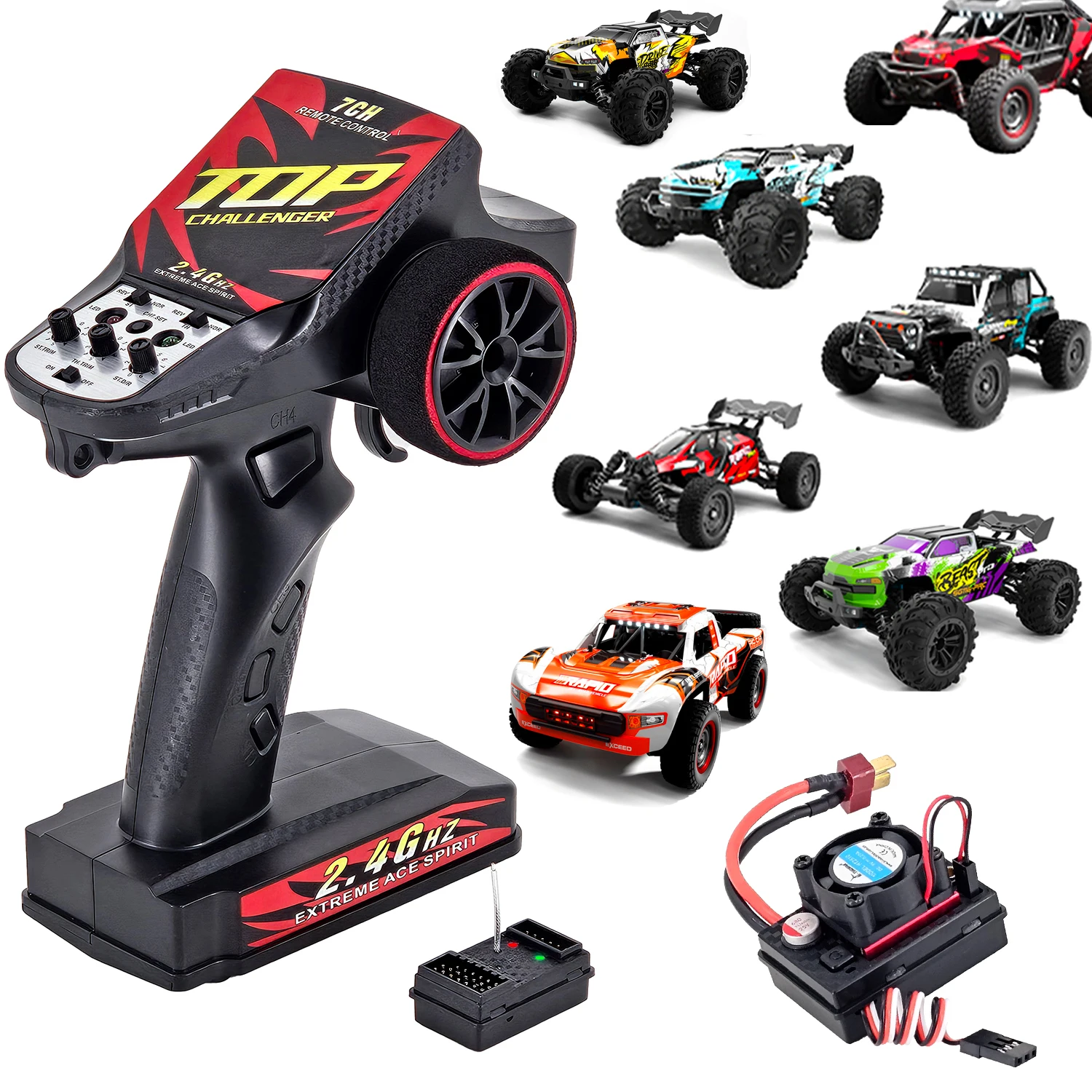
7CH 2.4GHz Transmitter & Receiver ESC Set Support 3S Lipo Battery Upgrade Parts For SCY16101Pro,16103Pro,SG116Pro,SG116 MAX,Q130
You will be redirected to AliExpress to complete your purchase
Specifications
- Brand Name
- JMRC HOBBY
- High-concerned chemical
- None
- Is Electric
- No Battery
- Is it battery/power supply
- N
- Is it charger/adapter
- N
- Origin
- Mainland China
- Is Batteries Included
- No
- Material
- Plastic
- Plastic Type
- ABS
- Recommend Age
- 14+y
- RC Parts & Accs
- Speed Controllers
- Size
- 155*90*195mm
- For Vehicle Type
- Cars
- Use
- Vehicles & Remote Control Toys
- Certification
- CE
- Remote Control Peripherals/Devices
- Remote Controller
- Tool Supplies
- Battery
- Quantity
- 1 pcs
- Technical parameters
- value 2
- Model Number
- 2808
- Four-wheel Drive Attributes
- Assemblage
- Wheelbase
- Screws
- Frequency
- 2.4GHz
- Channel
- 7CH
- ESC
- 45A 3Mode Brushless ESC
- Control Distance
- About 120m
- Choice
- yes
- semi_Choice
- yes
Product Description
7CH 2.4GHz Transmitter & Receiver ESC Set Support 3S Lipo Battery Upgrade Parts For SCY16101Pro,16103Pro,SG116Pro,SG116 MAX,Q130
Features
Item Number:JM-2808
Frequency:2.4GHz
Channel: 7-Channels
Control Distance: About 120 Meters
ESC:3 Brakes Modes 45A Brushless ESC,Support 2S-3S Lipo Battery
ESC SPEC:
Dimensions:46.5*33.4*20 mm
Weight:33.3g
Continuous Current: 45A
Burst Current: 150A
Battery: 2-3 S Li-po battery
BEC Output Voltage: 5.5V/3.5A
Power Supply Plugs: T Male
Motor Plugs: Female 3.5mm Bullet Connector
There are 3 Brake Modes,Each Click on the Power on/off switch,Braking Force will change in turns
Green Indicator: 60% Braking Force
Red Indicator: 75% Braking Force
Red&Green Indicators: 100% Braking Force
After the setting is made, the set brake force will be the default upon the next startup.
FUNCTIONS & INSTRUCTIONS
1. Open the battery coverandinsert 4 AA batteries.
2. Turn on the power switch⑦ of the remote control, the power indicator
Light④ of the controller is always on, and the Binding indicator⑩ light flashes.
3. Quickly turn on the power switch of the remote control model car, and the indicator light on the remote
control model car flashes.
4. Turn the steering wheel①, and the remote control model The front wheels of the car rotate left and right
synchronously to complete the frequency matching.
5. Place the rumor control model car in the air and turn the steering hand wheel. The control model car has
corresponding left and
right steering reactions. If it is reversed, you can adjust the switch③. Adjust the rudder amount⑨ according to your
actual situation
and fine-tune it. Turn left to make the left and right steering angle smaller, turn to the right to make the left and right steering angle larger, and
turn right to the bottom to maximize the steering angle.
6. Check whether the front wheels are in the neutral position and adjust the steering neutral position fine adjustment⑤. Turning to the left causes the two front wheels to turn to the left; turning to the right means the two front wheels turn
to the right.
7. Check whether the accelerator is in the neutral position. After turning on the power and binding, place car in floating state,if the wheels spinning,then adjustthe throttle trim⑥ until the accelerator is not moved and the car is in a stationary state. Use the throttle to move the machine backward and pull the four wheels of the car forward. Push the car forward to brake the four wheels first. Return to the
neutral position and then push the car forward to move backward (depending on the actual setting of the ESC, this is
the normal situation) ). If the above action is reversed, you can adjustthrottle reverse② to achieve the required driving direction.
8. CH4⑪ is the gear shifting channel, CH3⑫ is the light control channel, and can also be used as the steering gear
control channel. CH5⑬ is the front differential lock control channel, and CH6⑭ is the rear differential lock control channel.
9. CH7⑧ pattern plate control channel, press and hold to start the pattern plate to rotate forward or reverse, press and holdagain to stop.
CH7 is also the receiver linkage light group setting key.
1. Press once for the left and right turn signals to flash,
2. Press for the second time for the turn signals to flash off,
3. Press for the third time for the flash lights to flash,
4. Press for the 4th time for all lights to flash quickly,
5. Press for the fifth time for all lights to flash. Slow flash
6. Press the 6th time to return to normal mode
Product information last updated on December 25, 2025