
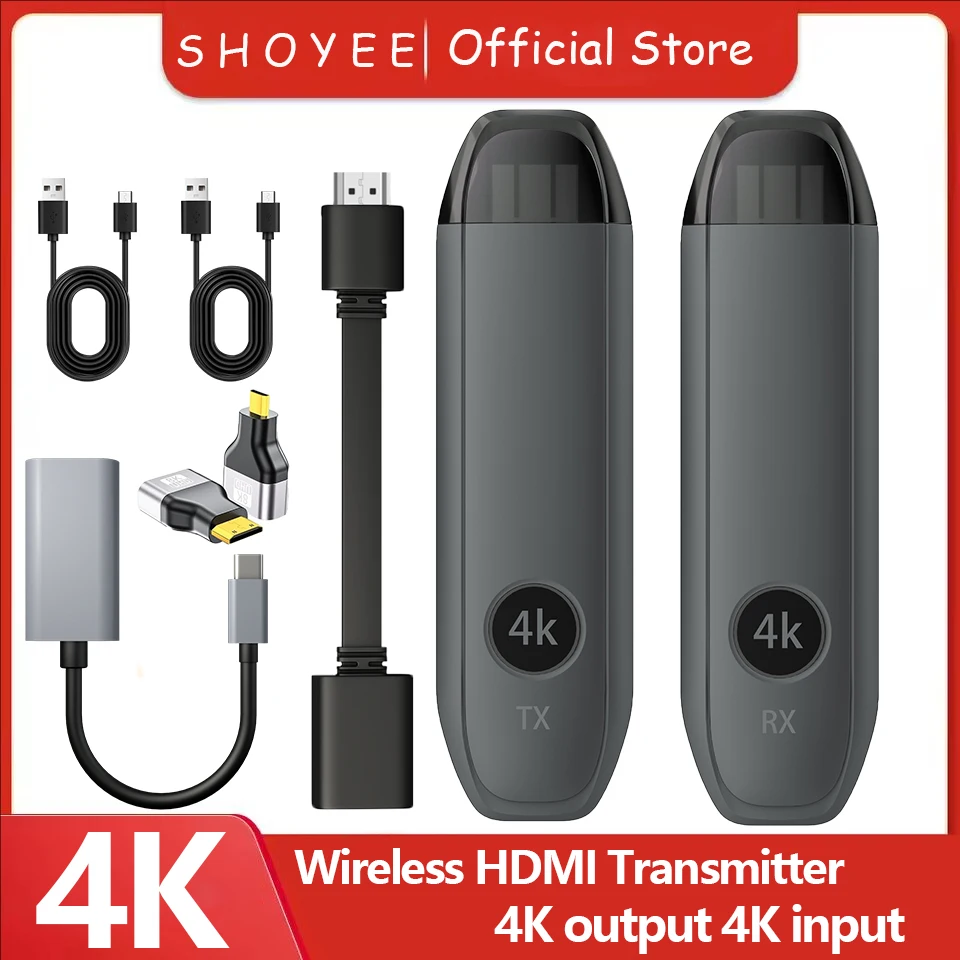
Wireless HDMI Transmitter & Receiver, 4K Decode Input 4K@30Hz Output, Ultra-Low Latency Plug & Play for Gaming, Home Theater
4.269+ sold
$39.63$84.32
53% OFFBuy on AliExpress
You will be redirected to AliExpress to complete your purchase
Specifications
- Brand Name
- SHOYEE
- Origin
- Mainland China
- High-concerned chemical
- None
- Antenna Type
- External
- Wi-Fi Range
- 50m
- Item Type
- TV stick
- Decode Ability
- Standard
- Transmission distance
- 50m
- Recording
- No
- Connectors
- HDMI-Compatible
- Certification
- CE, FCC
- Resolution
- 4K
- Remote Control
- Not Included
Product Description
Description
4K Product Introduction
The HDMI wireless transmitter adopts the standard Wifi protocol and transmits high-definition audio and video signals through 5G WiFi, which can be used for DVD players, players, PCs, etc
The HDM high-definition video of the device is transmitted through WiFi, enabling one-to-one application. The device has excellent image processing and transmission capabilities, making signal transmission smoother and more stable.
Main characteristics
1. Transmit HDMI video and audio signals over long distances via WiFi, up to 50 meters in length;
2. Compatible with HDMI 1.4 and 1.3 interfaces;
3. Able to automatically recognize and configure various display modes;
4. Built in automatic balancing system, smooth, clear, and stable screen;
5. Both receiving and transmitting are HDMI interfaces, no software, settings, or drivers are required, and the screen can be projected by connecting;
Technical parameter
video
HDMI protocol: HDMI 1.4
Maximum supported resolution: 4K@30Hz
Interface: HDMI A interface
Impedance: 100
Output: HDMI (synchronous audio and video output)
Encoding format: H.264
WIFI:2.4G+5G
Protocol: Standard 802.11 a/b/g/n/ac
Transmission distance: up to 50 meters in open environments
Power supply: USB power supply: 5V/2A
Maximum power consumption: MAX 3W
Working temperature/humidity: 0 '℃~50 ° C/10%~80% RH (non solidifying)
launcher
Number of interfaces: 1
Interface: HDMI
Resolution: 4K
Receiver
Operating memory: 2GB
Storage space: 1G
Reception: Built in antenna
Interface: HDMI
Function: It can realize the integration of laptops and tablets with LCD displays, projectors, and touch all-in-one machines
Wireless screen mirroring is performed on display devices such as LED splicing screens.
Resolution: 3840x2160 30P, 1920x108060P, 1280x72060P
1024x768 60P, 1280x8060P, 1920x120060P
Frame rate: 30-60 frames per second
Delay: 80-100ms (open environment)
Transmitter Port Description
Port Name: Function Description
Function keys: reset key+pairing
Indicator light: Connection status display
USB-C power port: power input
HDMI: HDMI input
Receiver Port Description
Port Name: Function Description
Function keys: reset key+pairing
Indicator light: power indicator display
USB-C power port: power input
HDMI: HDMI output
Lnstallation steps
Receiver+transmitter combination, plug and play
1. Connect the HD port of the receiver to the video input port of a display device such as a monitor or television.
2. Connect the USB-C power port of the receiver to a charging cable, plug it into a power adapter or USB power port (voltage 5V, current 2A), and turn on the power switch of the receiver.
3. Adjust the HD signal source of the monitor or TV to the corresponding HD port until the receiver's startup screen shows successful startup.
4. Connect the transmitter to a computer or other device with HD video output function. After the indicator light enters the flash state, wait for more than ten seconds to complete the projection.
Pairing instructions
The product has been paired before leaving the factory. Improper operation or other situations during use may cause pairing failure, and the device needs to be restored
The steps for re pairing are as follows:
1. Please hold down the receiver function key for more than 3 seconds, and a prompt message will pop up on the interface: Release the button to pair with EZCastTX. Wait for the transmitter to enter pairing mode.
2. Press and hold the transmitter function key for more than 5 seconds, and the indicator light will flash for pairing. Wait for the transmitter indicator light to turn on to indicate successful connection.
Notice:
The product is divided into two types, and the difference lies in:
Type C To HDMI can be used for mobile phone transmission
HDMI to HDMI cannot be used for mobile phone transmission
Please read carefully before purchasing, choose according to your needs
4K Product Introduction
The HDMI wireless transmitter adopts the standard Wifi protocol and transmits high-definition audio and video signals through 5G WiFi, which can be used for DVD players, players, PCs, etc
The HDM high-definition video of the device is transmitted through WiFi, enabling one-to-one application. The device has excellent image processing and transmission capabilities, making signal transmission smoother and more stable.
Main characteristics
1. Transmit HDMI video and audio signals over long distances via WiFi, up to 50 meters in length;
2. Compatible with HDMI 1.4 and 1.3 interfaces;
3. Able to automatically recognize and configure various display modes;
4. Built in automatic balancing system, smooth, clear, and stable screen;
5. Both receiving and transmitting are HDMI interfaces, no software, settings, or drivers are required, and the screen can be projected by connecting;
Technical parameter
video
HDMI protocol: HDMI 1.4
Maximum supported resolution: 4K@30Hz
Interface: HDMI A interface
Impedance: 100
Output: HDMI (synchronous audio and video output)
Encoding format: H.264
WIFI:2.4G+5G
Protocol: Standard 802.11 a/b/g/n/ac
Transmission distance: up to 50 meters in open environments
Power supply: USB power supply: 5V/2A
Maximum power consumption: MAX 3W
Working temperature/humidity: 0 '℃~50 ° C/10%~80% RH (non solidifying)
launcher
Number of interfaces: 1
Interface: HDMI
Resolution: 4K
Receiver
Operating memory: 2GB
Storage space: 1G
Reception: Built in antenna
Interface: HDMI
Function: It can realize the integration of laptops and tablets with LCD displays, projectors, and touch all-in-one machines
Wireless screen mirroring is performed on display devices such as LED splicing screens.
Resolution: 3840x2160 30P, 1920x108060P, 1280x72060P
1024x768 60P, 1280x8060P, 1920x120060P
Frame rate: 30-60 frames per second
Delay: 80-100ms (open environment)
Transmitter Port Description
Port Name: Function Description
Function keys: reset key+pairing
Indicator light: Connection status display
USB-C power port: power input
HDMI: HDMI input
Receiver Port Description
Port Name: Function Description
Function keys: reset key+pairing
Indicator light: power indicator display
USB-C power port: power input
HDMI: HDMI output
Lnstallation steps
Receiver+transmitter combination, plug and play
1. Connect the HD port of the receiver to the video input port of a display device such as a monitor or television.
2. Connect the USB-C power port of the receiver to a charging cable, plug it into a power adapter or USB power port (voltage 5V, current 2A), and turn on the power switch of the receiver.
3. Adjust the HD signal source of the monitor or TV to the corresponding HD port until the receiver's startup screen shows successful startup.
4. Connect the transmitter to a computer or other device with HD video output function. After the indicator light enters the flash state, wait for more than ten seconds to complete the projection.
Pairing instructions
The product has been paired before leaving the factory. Improper operation or other situations during use may cause pairing failure, and the device needs to be restored
The steps for re pairing are as follows:
1. Please hold down the receiver function key for more than 3 seconds, and a prompt message will pop up on the interface: Release the button to pair with EZCastTX. Wait for the transmitter to enter pairing mode.
2. Press and hold the transmitter function key for more than 5 seconds, and the indicator light will flash for pairing. Wait for the transmitter indicator light to turn on to indicate successful connection.
Notice:
The product is divided into two types, and the difference lies in:
Type C To HDMI can be used for mobile phone transmission
HDMI to HDMI cannot be used for mobile phone transmission
Please read carefully before purchasing, choose according to your needs
Pros & Cons
Pros
- Supports 4K@30Hz with ultra-low latency
- 50m wireless range for flexible setups
- Plug & play, no complex setup needed
- Compatible with PCs, DVDs, gaming consoles
Cons
- 30Hz limit may not suit high-refresh gaming
- No recording or remote included
- Relies on 5G WiFi, potential interference
- External antenna may add bulk
Common Questions
What resolution and latency does the Wireless HDMI Transmitter support?
4K@30Hz output with 4K decode input, ultra-low latency via 5G WiFi.
What is the transmission distance and range?
Up to 50m WiFi range with external antenna, plug & play for gaming/home theater.
What devices is it compatible with?
Works with DVD players, PCs, TVs via HDMI; standard WiFi protocol for HD video/audio.
Does it include a remote or recording features?
No remote control or recording; certifications CE, FCC.
What is the shipping origin and connectors?
Origin Mainland China; HDMI-compatible connectors, TV stick item type.
Product information last updated on November 27, 2025