
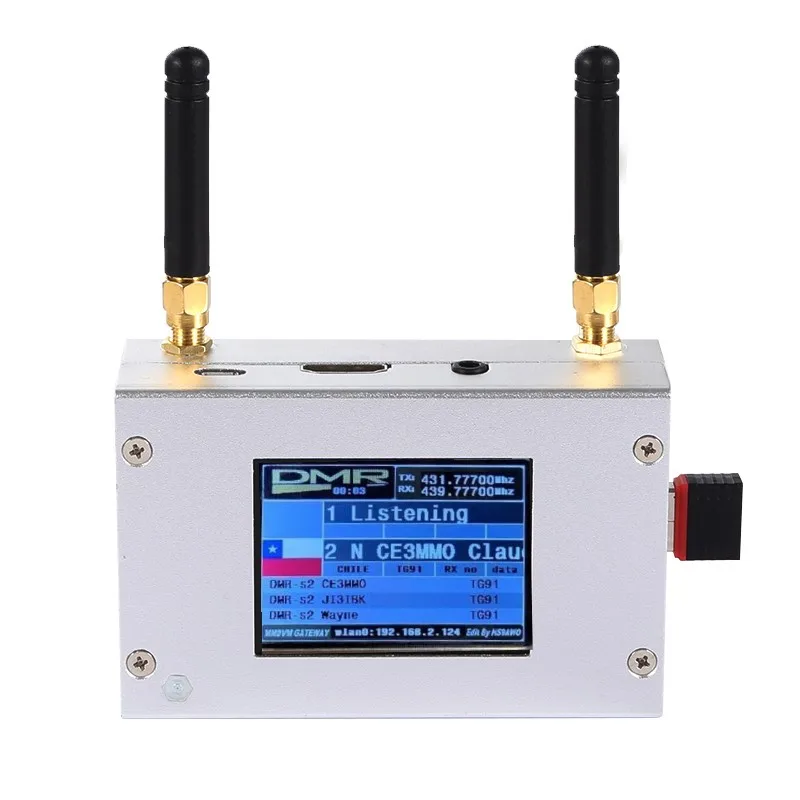
Hotspot mmdvm duplex com tela colorida de liga de alumínio com suporte para c4fm/dmr/dstar p25 com raspberry pi 1b +
You will be redirected to AliExpress to complete your purchase
Specifications
- Nome da marca
- AISANRAY
- Tipo de Item
- Adaptador
- Produto Químico de Alta Preocupação
- Nenhum
- Origem
- CN (Origem)
- Material
- Metal
- Número do modelo
- Duplex MMDVM
Product Description
Duplex MMDVM Hotspot w/ Aluminum Alloy Shell Color Display Screen Supporting For C4FM/DMR/DSTAR P25
Description:
It is a MMDVM hotspot digital networking box. Display firmware has been updated. Imported temperature-compensated crystal oscillators in DMR format with zero frequency offset and duplex dual time slots are used. It supports C4FM, DMR, DSTAR P25 and other digital formats. It solves inconsistency in digital intercom mechanism, enabling multi-digital system intercommunication. Using mobile phone hotspot network or WiFi network to connect to the Internet, it meets your dream of connecting with HAMs around the world.
Package Included:
1 x Set of MMDVM Hotspot
WiFi Settings when MMDVM is Started for the First Time:
I. Connect to Automatic AP Hotspot:
1. The hotspot is powered on.
2. Wait for Pi-Star to start. It usually takes about a minute (it will take longer if you use Pi0W). If your hotspot has a screen display, you can watch Pi-Star start up until the login prompt appears.
3. Wait 2 minutes for the Auto AP function to activate.
4. Check the hotspot named "Pi-Star-Setup" on your computer or mobile phone, and connect. WiFi hotspot: Pi-Star-Setup; password: 12345678
II. Log in to the Pi-Star Page:
1. After the connection is successful, users for Windows visit: //pi-star. Users for macOS, iOS or other (tablet for Windows 10) visit: //pi‐star.local. Mobile device access: 192.168.50.1
2. The first time you start Pi-Star, you will see a page that displays "No Mode Defined...". Click Configuration, or wait 10 seconds to be redirected to the configuration page
3. Enter the configuration page and enter the account password to log in to the Pi-Star page. Default username: pi-star; password: 12345678
III. Add Personal WiFi Connection:
1. After entering the configuration page, scroll to the "wireless configuration section" and click Configure WiFi
2. Select your country code, click Scan for Netwroks (10 secs) to start searching for WiFi, and wait 10 seconds.
3. If there is no WiFi you want to add in the search results, you can add it manually.
4. When the hotspot is restarted, it will be connected to the set personal WiFi. Visit Pi-Star in the browser for other configurations.
Pros & Cons
Pros
- Case em liga de alumínio, resistente e duradouro
- Suporta múltiplos protocolos de rádio digital (C4FM, DMR, DSTAR, P25)
- Possui tela colorida com firmware atualizado
- Usa oscilador de cristal compensado por temperatura sem desvio de frequência
Cons
- Não há informações detalhadas sobre o tamanho exato do dispositivo
- Não especifica se a fonte de alimentação é inclusa no pacote
- A descrição do produto foi truncada, faltando detalhes completos sobre o funcionamento
- Requer o Raspberry Pi para funcionar, o que pode aumentar o custo total do projeto
Common Questions
Qual o material do acabamento deste hotspot MMDVM duplex?
O dispositivo conta com um acabamento em liga de alumínio, conforme as especificações fornecidas.
Quais protocolos de comunicação digital este hotspot suporta?
Ele suporta os protocolos C4FM, DMR, DSTAR e P25, conforme o título e a descrição do produto.
Este hotspot vem com o Raspberry Pi incluso?
Sim, o produto inclui o Raspberry Pi 1B ou versões superiores, como informado no título.
Qual a finalidade principal deste dispositivo?
Trata-se de um box de rede digital MMDVM para criar hotspots de comunicação por rádio digital.
De onde é originado este produto?
A origem do produto é a China, conforme as especificações fornecidas.
Product information last updated on November 30, 2025